Two photos in · One 15-second clip out
Zombie AI Trend Generator
Upload two photos: one of the person holding the gun, one of the person who turns. Get back the zombie AI trend video, 15 or 30 seconds long.
Photo 1 · Holds the gun
Photo 2 · Turns into a zombie
One person per photo, face clearly visible
No prompt to write. Ready in about three minutes. From $4.99.
How it works
Three steps, no prompt
To make the zombie AI trend video here, add two photos, pick a length, a format and a quality, and press Generate. A 15-second clip is ready in about three minutes.
1. Add two photos
One person in each. A clear, front-facing face works best.
2. Pick the shape
Pick 15 seconds, or 30 seconds like the first video of the trend. Landscape 16:9 is how that video and most remakes were posted; vertical 9:16 fills the screen on TikTok and Reels.
3. Get your clip
We render the whole clip in one go. It is saved under Your videos, so you can close the page and come back.
Where the trend came from
The zombie AI trend, also searched as the AI zombie trend, the zombie AI video or the Zombie Love Story, is a short AI video made from two photos. One person has turned into a zombie. The other raises a gun, cannot fire, and opens their arms. As they embrace, the video cuts to a happy memory of the two of them.
The earliest version we could trace was posted on TikTok on 27 September 2026: a 30-second landscape clip set in an ordinary lived-in house, cutting to a wheat field at sunset. Later remakes moved the story to a ruined kitchen, a snowy cabin or a hilltop. This generator follows the first version.
Source: the account that posted the first video, on TikTok. Checked on 7 October 2026.
What you get
Four beats, one hard cut
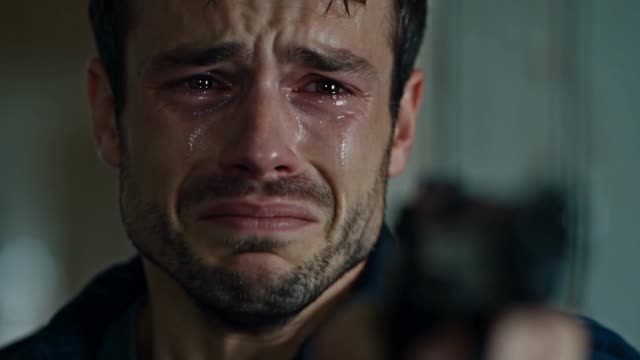 0:00
0:00Tears and a raised gun
The person from photo 1 aims a pistol and cannot stop crying. The gun stays a blur in the foreground.
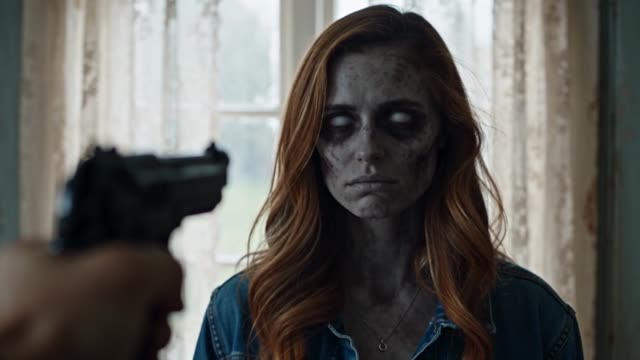 0:02
0:02Someone they love, turned
The person from photo 2 stands by the window, pale and still. The face is clearly theirs.
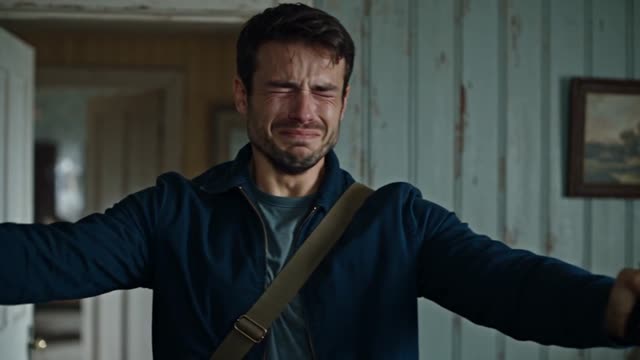 0:03
0:03The gun lowers
They can't fire. The pistol drops to their side, the arms open, the eyes close.
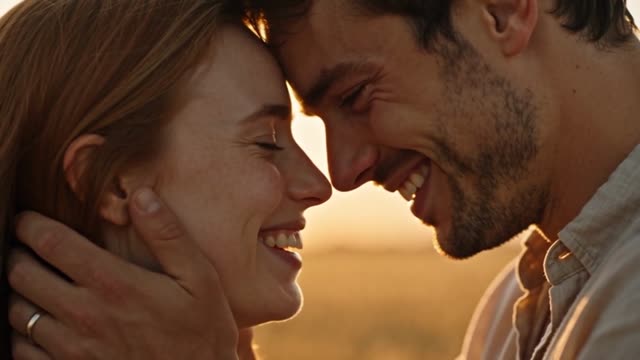 0:06
0:06Cut to the wheat field
As they embrace, the film cuts hard to the two of them laughing at sunset. It ends on a kiss on the forehead.
- File15 or 30 seconds, MP4
- ShapeLandscape 16:9 or vertical 9:16
- Quality480p or 720p
- SoundSound from the scene, no music — add the trending sound when you post
- ExportNo watermark
Every video is one MP4, 15 or 30 seconds long, in landscape 16:9 or vertical 9:16, at 480p or 720p, with the sound of the scene and no music and no watermark.
Two ways to make it
Making it yourself in Dreamina or CapCut, or here
Most tutorials have you upload the same two photos twice and generate two clips, the standoff and the memory, in an AI video model such as Seedance (inside Dreamina), Kling or Veo. You then join the clips in CapCut or VN. Here both scenes are rendered as one clip, already cut on the embrace.
| Yourself | Here | |
|---|---|---|
| What you write | A page-long prompt, twice | Nothing |
| What you generate | Two clips, then cut them together | One finished clip |
| Editing | Match the cut by hand | Already cut on the moment they touch |
| If it comes out wrong | Pay for every retry | Credits come back when a render fails |
Honest notes
What works, and what doesn't
We ran this generator ourselves before opening it. On 7 October 2026 two 15-second videos at 480p took 3 min 04 s and 3 min 13 s to render. Both kept the two faces recognisable. In the second one the eyes of the turned character came out whiter than our script asks for, which is the kind of drift you should expect now and then.
The videos are rendered by Seedance 2.5, a video model made by ByteDance. Your two photos go in as reference images, one for each character, together with a fixed script we wrote from the first video of the trend.
Zombie AI Trend does not make pet versions, does not let you pick a different scene, and has no free trial.
Works best: one clear face per photo, looking at the camera, even light, shoulders or half body in frame.
Struggles with: sunglasses, masks, heavy filters, group photos, side profiles and tiny faces.
It stays gentle.
No blood, no bite, and the gun is never fired. It is a love story, not a horror clip.
Faces are recreated by AI.
Expect a strong likeness, not a perfect copy.
Use your own photos.
Only upload yourself, or people who said yes.
Pricing
Pay once. No subscription.
One video, one payment. Pick 15 seconds, or 30 seconds like the first video of the trend.
No subscription and nothing renews. If a render fails, you get the credit back.
15 seconds
$4.99/ video
- One 15-second video, Standard 480p
- Landscape 16:9 or vertical 9:16
- Sound from the scene, no music
- No watermark, MP4 download
30 seconds
$9.99/ video
- One 30-second video, Standard 480p
- Landscape 16:9 or vertical 9:16
- Sound from the scene, no music
- No watermark, MP4 download
- The full story: every shot of the original
HD 720p costs twice as much: $9.99 for 15 seconds, $19.99 for 30.
Credits last 12 months. If a render fails, its credits come back on their own.
FAQ
Before you pay
Is the zombie AI trend generator free?
No, and there is no free trial. A 15-second video costs $4.99 and a 30-second video costs $9.99, paid once. HD 720p doubles the price.
Do I have to write a prompt?
No. Upload two photos and press Generate. The story, the cut and the sound are already set.
How long does it take?
About three minutes in our own tests at 480p (3 min 04 s and 3 min 13 s). You can close the page; the clip is saved under Your videos.
What if the render fails?
The credits for that video return to your balance automatically. If a clip comes out clearly broken, email us and we will make it right.
Is there a watermark?
No. The MP4 you download has no watermark.
Is this a subscription?
No. Credits are bought once in a pack and last 12 months. Nothing renews.
What happens to my photos?
They are used only to make your video and are never shown publicly. You can email us to have them deleted.
Can I use a photo of my pet?
Not yet. The generator needs two people, one in each photo. A pet version is planned.
Can I choose the scene?
Not yet. Every video uses the same story: a lived-in home in cold light, then a wheat field at sunset. The ruined-kitchen, snowy-cabin and hilltop remakes are not offered.
Will it look exactly like us?
Close, not identical. Clear, front-facing photos give the best likeness.
More: How a video gets made · Prices in full · Contact support. Page last checked on 7 October 2026.